mirror of
https://github.com/brockar/fAuxLICE.git
synced 2026-01-11 14:50:57 -03:00

fauxlice
Get ready
Clone the vial-qmk repo, create a folder called fauxlice in vial-qmk/keyboards/, and copy all files from this folder to it.
Navigate to the vial-qmk folder in your terminal and make the modifications you want in keyboards/fauxlice.
Compile
Compile (after setting up your build environment):
make fauxlice:vial
Flashing example for this keyboard:
make fauxlice:vial:flash
See the build environment setup and the make instructions for more information. Brand new to QMK? Start with our Complete Newbs Guide.
Bootloader
Enter the bootloader in 3 ways:
- Keycode in layout: Press the key mapped to
QK_BOOT - Bootmagic reset: Hold down the key at (0,0) in the matrix (usually the top left key or Escape) and plug in the keyboard
- Physical reset button: Briefly press the button on the back of the PCB
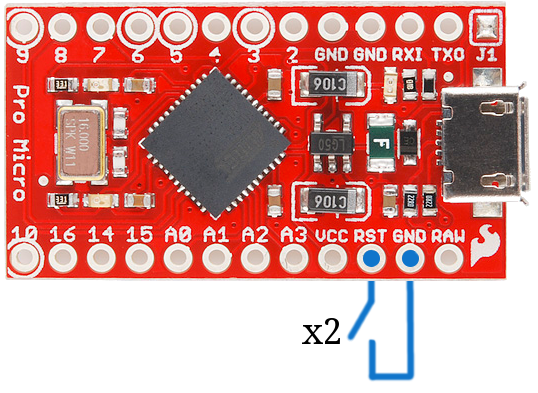
- Some may have pads you must short instead
Extras to Read
- Vial: Less Memory
- If you use QMK, consider checking out pipx.
- If flashing on Linux, use:
sudo path/to/qmk flash -kb fauxlice -km vial